Ephemeral Meeting Platform

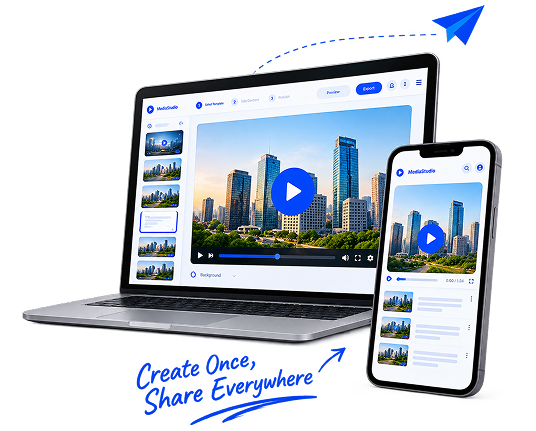
Welcome to Screen Presentations, the home of the future meetings platform: Ephemeral Meeting Experience.

The Ephemeral Meeting Platform for Screen-Based Collaboration.

  • PDF Presentation & Live Editing
  • Whiteboard Collaboration
  • Ephemeral & Zero Clutter
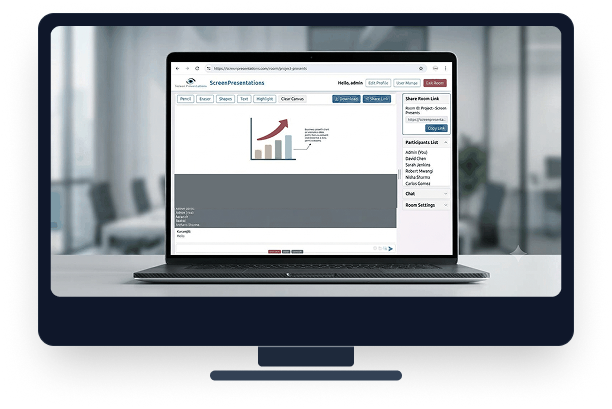
Screen Presentations Future Meetings Platform Dashboard

What is Screen Presentations?

Screen Presentations is the Ephemeral Meeting Platform for Screen-Based Collaboration. Unlike traditional meeting applications that centre around video windows, Screen Presentations places the screen presentation at the heart of the meeting experience.

Every presentation becomes a live collaborative workspace where participants can view content, discuss ideas, share knowledge and make decisions in real time. Whether you are conducting training, presenting proposals, reviewing projects or collaborating with clients, Screen Presentations transforms passive viewers into active participants.

Built around the principles of ephemeral communication, Screen Presentations helps teams focus on the conversation, the content and the outcome, rather than creating unnecessary digital clutter. The result is a more engaging, productive and focused way to meet online.

Screen Presentations is not simply a tool for sharing screens. It is a platform where presentations become meetings and collaboration happens naturally.

Explore Platform Overview
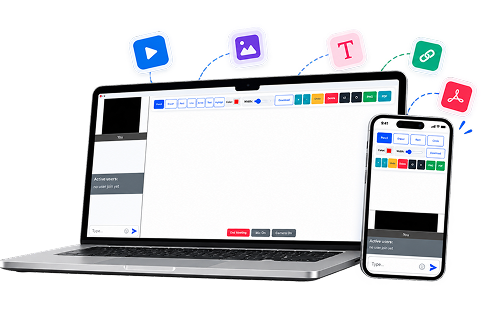
Screen Presentations Multi-Device SaaS Platform

The Advantages of an Integrated Ephemeral Meeting and Collaboration Platform

Modern teams increasingly rely on multiple applications for video meetings, document sharing, presentations, whiteboards, PDF editing, file transfers and chat. This creates unnecessary complexity, fragmented workflows and a growing collection of records that must be managed, stored and secured.

An integrated collaboration platform brings these capabilities together into a single workspace, enabling participants to communicate, present, share information and collaborate in real time without constantly switching between different applications. The result is faster decision-making, more productive meetings and a more streamlined user experience.

PDF Presentation Feature

PDF Presentation Feature

The ability to present PDF documents directly within a meeting eliminates the need to convert documents into slide decks or use separate presentation software. Reports, proposals, contracts, manuals and training materials can be displayed exactly as intended.

Integrated PDF Editing Tool

Integrated PDF Editing Tool

Participants can edit PDF files during a meeting without leaving the collaboration environment. Changes can be made, reviewed and approved collaboratively in real time.

PDF Slide Creation from Whiteboard Content

PDF Slide Creation from Whiteboard Content

Ideas, diagrams and meeting outcomes developed on the whiteboard can be converted directly into PDF presentation slides, turning brainstorms into formal presentations.

Import Documents & Images onto Whiteboard

Import Documents & Images onto Whiteboard

Users can import files from their devices or capture images live using a camera and immediately place them onto the shared canvas for collaborative discussion.

Direct Device-to-Device File Transfer

Direct Device-to-Device File Transfer

Files can be transferred directly between participants during a meeting without relying on external file-sharing services, supporting rapid exchange of materials.

Live Group Text Chat

Live Group Text Chat

Meeting participants can communicate through a shared group chat while collaborating, allowing links, comments and notes to be shared instantly alongside voice and video.

Ephemeral Meetings

Ephemeral Meetings

Ephemeral meetings are designed around live interaction rather than the creation of permanent records, reducing digital clutter and focusing on the live outcome.

Cross-Platform PC and Mobile Support

Cross-Platform PC and Mobile Support

Participants can join meetings from desktop computers, laptops, tablets or mobile devices with a unified, responsive interface from anywhere.

Explore All 14 Platform Capabilities →
PLATFORM ADVANTAGE

Why Should You Choose Screen Presentations?

Screen Presentations is more than a screen-sharing tool. It is an Ephemeral Meeting Platform designed to make presentations the centre of collaboration.

  • Engage, Don’t Just Present

    Turn passive viewers into active participants. Every presentation becomes a live meeting space where people can discuss ideas, ask questions and contribute in real time.

  • Keep Meetings Focused

    By centring the meeting around the presentation, participants stay focused on the content being discussed rather than being distracted by multiple windows and competing activities.

  • Improve Collaboration

    Presentations become shared workspaces where teams can communicate clearly, review information together and make decisions faster.

  • Support Any Meeting Type

    Whether you're delivering training, presenting a proposal, conducting a project review, collaborating with clients or leading a strategic discussion, Screen Presentations adapts to the way you work.

  • Reduce Digital Clutter

    Built around the principles of ephemeral collaboration, Screen Presentations emphasises live interaction and engagement, helping keep attention on the conversation and the outcome.

  • Increase Productivity

    When everyone is focused on the same screen and the same discussion, meetings become more efficient, decisions are made faster and outcomes improve.

A Better Way to Meet

Screen Presentations transforms presentations from something you show into a place where people meet, collaborate and make decisions together.

Why Choose Screen Presentations Collaborative Workspace

How to Use Screen Presentations

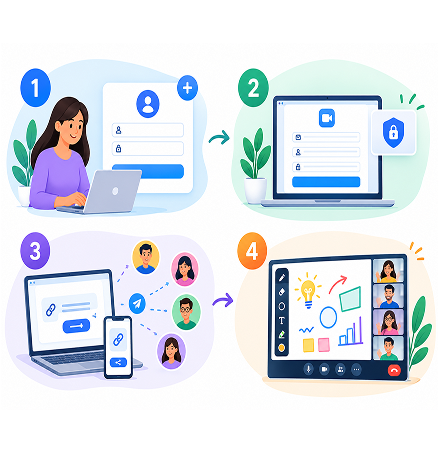
Screen Presentations is an online meeting and collaboration platform that allows users to create or join meeting rooms, invite participants, and collaborate in real time. It provides interactive drawing tools to make meetings, presentations, and discussions more engaging. Users can annotate the workspace, share ideas, and export their work for future reference.

  1. Log in or create your account

    Open your account, log in with your credentials, or create a new account to get started.

  2. Create a new meeting room

    Click on “Create A New Room,” enter a room ID, your name, and set a password if needed.

  3. Invite other participants

    Share the room ID or meeting link with your colleagues, clients, or students so they can join the room.

  4. Use the presentation and drawing tools

    Use tools like pencil, eraser, shapes, text, and highlight to annotate your screen and make your presentation interactive.

How to Use Screen Presentations 4 Steps Guide
SECTION 3.5

Contact Us & Inquiries

Have questions about ephemeral meetings, platform features, or enterprise deployment?
Send our team a message.

Let's Start a Conversation.

Have a question or need assistance? We’re just a message away. Get in touch with our team, and we’ll be happy to help.

Screen Presentations Dedicated Customer Support